Configure an FMOD Playback Component
中文 | English
Run this command at the repository root to replay the examples through the local Unity MCP. The command also captures screenshots in both languages.
python Docs/Manual/manual/tools/tutorials.py run fmod-play-component --capture
Click to expand MCP actionsClick to collapse MCP actions
Prepare the teaching sample. The recipe provides ${variables}.
{
  "variables": {
    "asset": "${fixture}/Tutorial_Fmod.prefab"
  },
  "calls": [
    {
      "tool": "invoke",
      "arguments": {
        "path": "static:UnityEditor.AssetDatabase/CreateFolder",
        "args": [
          "${fixtureParent}",
          "${folder}"
        ]
      },
      "expect": {
        "regex": "\\(String\\) [a-f0-9]{32}"
      }
    }
  ]
}
This page describes FmodPlayComponent: a MonoBehaviour that plays a configured FMOD event when its GameObject is enabled.
1. Component
Add FmodPlayComponent to the GameObject that should emit sound. This example saves the component in a separate Tutorial_Fmod.prefab for reuse. Place that object at the required sound origin when using it in a scene.
Click to expand MCP actionsClick to collapse MCP actions
[
  {
    "tool": "prefab_edit",
    "arguments": {
      "json": {
        "path": "${asset}",
        "mode": "create",
        "component": "ShanghaiWindy.Core.FmodPlayComponent"
      }
    },
    "expect": {
      "equals": {
        "ok": true
      }
    }
  }
]
2. Event
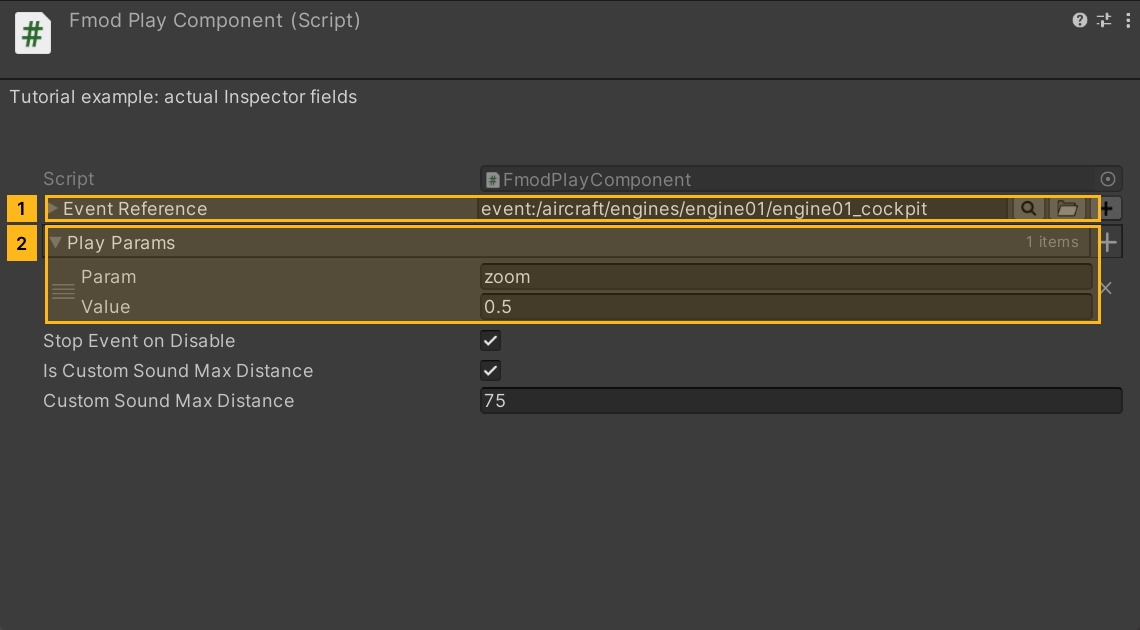
eventReference is a private [SerializeField] EventReference struct, not a draggable ScriptableObject. Choose a real event in the inspector event picker, for example event:/aircraft/engines/engine01/engine01_cockpit.
Click to expand MCP actionsClick to collapse MCP actions
[
  {
    "tool": "list",
    "arguments": {
      "path": "static:FMODUnity.EventManager/Events",
      "fields": "Path,Guid/Data1,Guid/Data2,Guid/Data3,Guid/Data4",
      "search": "event:/aircraft/engines/engine01/engine01_cockpit",
      "count": 5
    },
    "expect": {
      "regex": "\\n\\d+\\tevent:/aircraft/engines/engine01/engine01_cockpit\\t(-?\\d+)\\t(-?\\d+)\\t(-?\\d+)\\t(-?\\d+)"
    },
    "capture": {
      "Data1": {
        "regex": "\\n\\d+\\tevent:/aircraft/engines/engine01/engine01_cockpit\\t(-?\\d+)\\t(-?\\d+)\\t(-?\\d+)\\t(-?\\d+)",
        "group": 1,
        "as": "int"
      },
      "Data2": {
        "regex": "\\n\\d+\\tevent:/aircraft/engines/engine01/engine01_cockpit\\t(-?\\d+)\\t(-?\\d+)\\t(-?\\d+)\\t(-?\\d+)",
        "group": 2,
        "as": "int"
      },
      "Data3": {
        "regex": "\\n\\d+\\tevent:/aircraft/engines/engine01/engine01_cockpit\\t(-?\\d+)\\t(-?\\d+)\\t(-?\\d+)\\t(-?\\d+)",
        "group": 3,
        "as": "int"
      },
      "Data4": {
        "regex": "\\n\\d+\\tevent:/aircraft/engines/engine01/engine01_cockpit\\t(-?\\d+)\\t(-?\\d+)\\t(-?\\d+)\\t(-?\\d+)",
        "group": 4,
        "as": "int"
      }
    }
  },
  {
    "tool": "invoke",
    "arguments": {
      "path": "static:FMODUnity.EventManager/EventFromPath",
      "args": [
        "event:/aircraft/engines/engine01/engine01_cockpit"
      ]
    },
    "expect": {
      "contains": "parameter:/engine01_cockpit/zoom"
    }
  },
  {
    "tool": "prefab_edit",
    "arguments": {
      "json": {
        "path": "${asset}",
        "mode": "update",
        "component": "ShanghaiWindy.Core.FmodPlayComponent",
        "values": {
          "eventReference": {
            "Path": "event:/aircraft/engines/engine01/engine01_cockpit",
            "Guid": {
              "Data1": "${Data1}",
              "Data2": "${Data2}",
              "Data3": "${Data3}",
              "Data4": "${Data4}"
            }
          }
        }
      }
    },
    "expect": {
      "equals": {
        "ok": true
      }
    }
  }
]
3. Parameters
Expand playParams, add one entry and set key = zoom, value = 0.5. The PlayParm fields are a string and a float, passed to setParameterByName before playback. The recipe queries the current event cache to confirm that the example event exists and defines zoom. For another event, use its actual parameter names.
Add one entry for each parameter you want to change. When the event's bank needs loading, the component waits for it asynchronously. Once an instance is ready, the component applies each configured parameter before starting playback.
Click to expand MCP actionsClick to collapse MCP actions
[
  {
    "tool": "prefab_edit",
    "arguments": {
      "json": {
        "path": "${asset}",
        "mode": "update",
        "component": "ShanghaiWindy.Core.FmodPlayComponent",
        "values": {
          "playParams": [
            {
              "key": "zoom",
              "value": 0.5
            }
          ]
        }
      }
    },
    "expect": {
      "equals": {
        "ok": true
      }
    }
  },
  {
    "tool": "inspect",
    "arguments": {
      "path": "asset:${asset}/GetComponent(ShanghaiWindy.Core.FmodPlayComponent)/playParams/0/key"
    },
    "expect": {
      "contains": "zoom"
    }
  }
]
4. Lifetime and distance
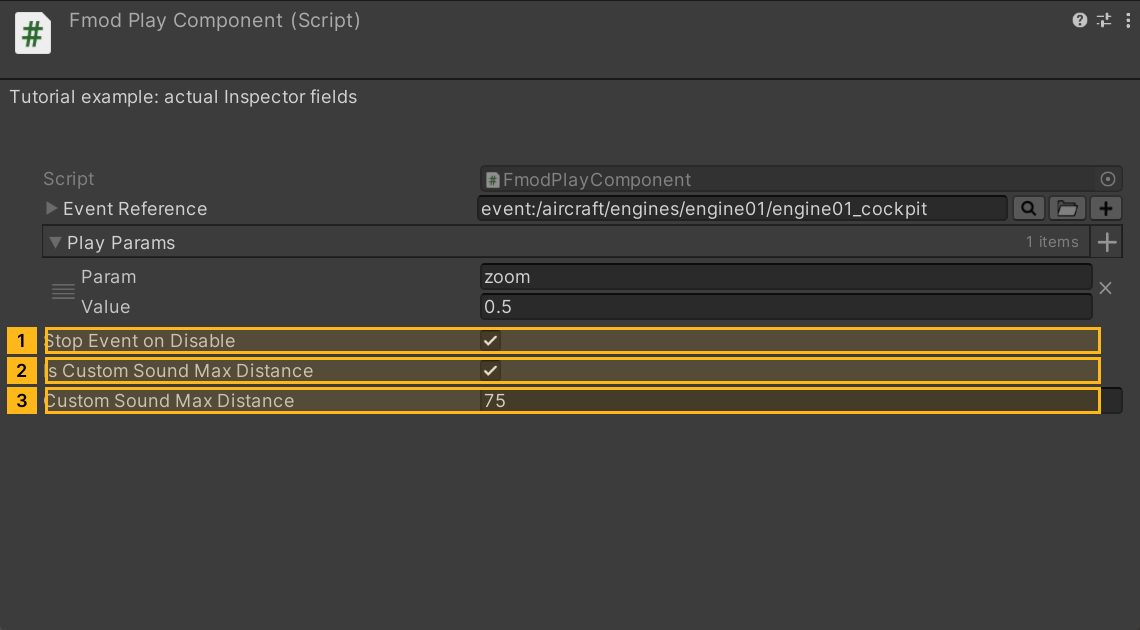
Enable isCustomSoundMaxDistance, then set the revealed customSoundMaxDistance to 75. The field is hidden while the override is off. The defaults are false and 50. This is a check before starting playback, rather than a continuously updated attenuation range.
OnEnable calls Play. If the camera is too far away at that point, playback does not start or automatically resume when it gets closer. An empty event, an unavailable pool or a failed bank load also prevents playback. Disabling or destroying the component cancels pending waits. With isStopEventOnDisable = true, an existing instance is returned to the pool; false takes the ReleaseEvent path and does not guarantee immediate silence. Keep it true for this example.
The older Inspector showed a separate autoplay toggle. In the current component, enabling the GameObject starts the playback attempt.
Click to expand MCP actionsClick to collapse MCP actions
[
  {
    "tool": "prefab_edit",
    "arguments": {
      "json": {
        "path": "${asset}",
        "mode": "update",
        "component": "ShanghaiWindy.Core.FmodPlayComponent",
        "values": {
          "isStopEventOnDisable": true,
          "isCustomSoundMaxDistance": true,
          "customSoundMaxDistance": 75
        }
      }
    },
    "expect": {
      "equals": {
        "ok": true
      }
    }
  },
  {
    "tool": "inspect",
    "arguments": {
      "path": "asset:${asset}/GetComponent(ShanghaiWindy.Core.FmodPlayComponent)/customSoundMaxDistance"
    },
    "expect": {
      "contains": "75"
    }
  }
]
The recipe verifies the prefab, event reference and parameter readback. Audible output, bank loading and in-game distance behavior still require runtime verification.