Your first Lua script: Hello World
中文 | English
Run this command at the repository root to replay the examples through the local Unity MCP. The command also captures screenshots in both languages.
python Docs/Manual/manual/tools/tutorials.py run lua-hello-world --capture
Click to expand MCP actionsClick to collapse MCP actions
Prepare the teaching sample. The recipe provides ${variables}.
{
  "variables": {
    "script": "${fixture}/HelloWorld.lua",
    "prefab": "${fixture}/Tutorial_HelloWorld.prefab"
  },
  "calls": [
    {
      "tool": "invoke",
      "arguments": {
        "path": "static:UnityEditor.AssetDatabase/CreateFolder",
        "args": [
          "${fixtureParent}",
          "${folder}"
        ]
      },
      "expect": {
        "regex": "\\(String\\) [a-f0-9]{32}"
      }
    }
  ]
}
In this example, the behavior calls OnStarted when it starts and prints Hello World.
1. Create the script
Save HelloWorld.lua under an asset folder in the Unity project. The importer recognizes it as a Lua behavior asset.
Behavior()
Property = {}

local HelloWorld = class("HelloWorld")

function HelloWorld:OnStarted()
    print("Hello World")
end

return HelloWorld
Click to expand MCP actionsClick to collapse MCP actions
[
  {
    "tool": "invoke",
    "arguments": {
      "path": "static:System.IO.File/WriteAllText",
      "args": [
        "${script}",
        "Behavior()\nProperty = {}\n\nlocal HelloWorld = class(\"HelloWorld\")\n\nfunction HelloWorld:OnStarted()\n    print(\"Hello World\")\nend\n\nreturn HelloWorld\n"
      ]
    },
    "expect": {
      "contains": "OK:"
    }
  },
  {
    "tool": "invoke",
    "arguments": {
      "path": "static:UnityEditor.AssetDatabase/ImportAsset",
      "args": [
        "${script}",
        "ForceSynchronousImport"
      ]
    },
    "expect": {
      "contains": "OK:"
    }
  }
]
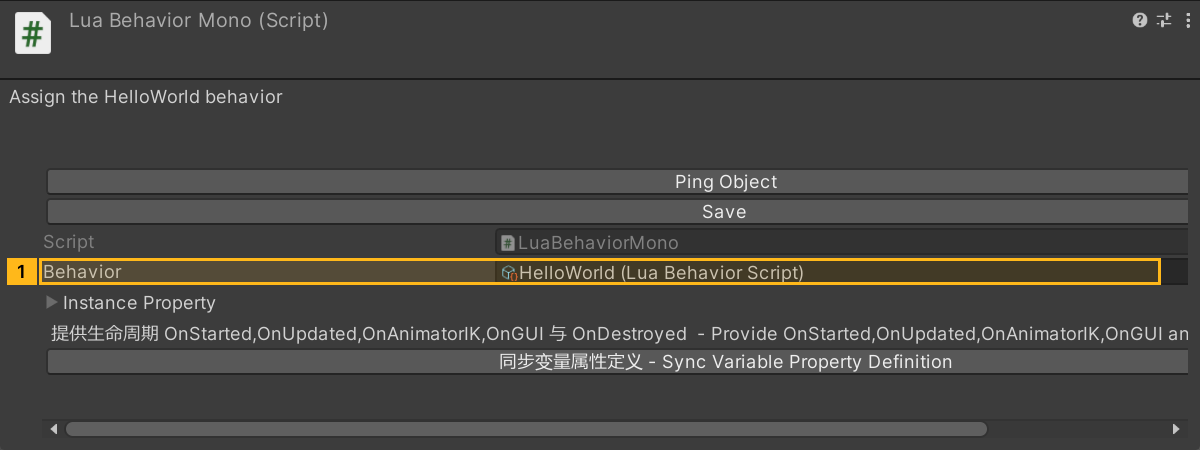
2. Bind the component
Add LuaBehaviorMono to the target object, assign HelloWorld to Behavior, and save the prefab. This script has no instance parameters.
Click to expand MCP actionsClick to collapse MCP actions
[
  {
    "tool": "prefab_edit",
    "arguments": {
      "json": {
        "path": "${prefab}",
        "mode": "create",
        "component": "ShanghaiWindy.Core.Lua.LuaBehaviorMono",
        "references": [
          {
            "property": "luaBehavior",
            "asset": "${script}",
            "type": "ShanghaiWindy.Core.Lua.LuaBehaviorScript"
          }
        ]
      }
    },
    "expect": {
      "equals": {
        "ok": true
      }
    }
  }
]
3. Check the result
Reopen the prefab and check that the script reference and OnStarted code were saved. When the object is loaded in game, check the startup log for Hello World. The teaching replay verifies the import and binding. In-game logging still needs a runtime check.
Click to expand MCP actionsClick to collapse MCP actions
[
  {
    "tool": "inspect",
    "arguments": {
      "path": "asset:${prefab}/LuaBehaviorMono/luaBehavior/name"
    },
    "expect": {
      "contains": "(String) HelloWorld"
    }
  },
  {
    "tool": "inspect",
    "arguments": {
      "path": "asset:${prefab}/LuaBehaviorMono/luaBehavior/lua"
    },
    "expect": {
      "contains": "print(\"Hello World\")"
    }
  }
]
Click to expand MCP actionsClick to collapse MCP actions
In-game check (not run). Start the behavior in a running scene that uses this prefab, then query recent logs.
[
  {
    "tool": "logs",
    "arguments": {
      "count": 50
    },
    "expect": {
      "contains": "Hello World"
    }
  }
]