Configure Lua instance properties
中文 | English
Run this command at the repository root to replay the examples through the local Unity MCP. The command also captures screenshots in both languages.
python Docs/Manual/manual/tools/tutorials.py run lua-properties --capture
Click to expand MCP actionsClick to collapse MCP actions
Prepare the teaching sample. The recipe provides ${variables}.
{
  "variables": {
    "script": "${fixture}/Example.lua",
    "prefab": "${fixture}/Tutorial_LuaProperties.prefab"
  },
  "calls": [
    {
      "tool": "invoke",
      "arguments": {
        "path": "static:UnityEditor.AssetDatabase/CreateFolder",
        "args": [
          "${fixtureParent}",
          "${folder}"
        ]
      },
      "expect": {
        "regex": "\\(String\\) [a-f0-9]{32}"
      }
    }
  ]
}
Declare defaults in the script's Property table, then set instance values on the prefab's LuaBehaviorMono. This example keeps the script default for multiplier at 2 while changing the prefab value.
1. Declare a number
Save Example.lua so the importer creates the behavior asset and its numeric field definition.
Behavior()
Property = { multiplier = { type = "number", value = 2 } }

local Example = class("Example")

return Example
Click to expand MCP actionsClick to collapse MCP actions
[
  {
    "tool": "invoke",
    "arguments": {
      "path": "static:System.IO.File/WriteAllText",
      "args": [
        "${script}",
        "Behavior()\nProperty = { multiplier = { type = \"number\", value = 2 } }\n\nlocal Example = class(\"Example\")\n\nreturn Example\n"
      ]
    },
    "expect": {
      "contains": "OK:"
    }
  },
  {
    "tool": "invoke",
    "arguments": {
      "path": "static:UnityEditor.AssetDatabase/ImportAsset",
      "args": [
        "${script}",
        "ForceSynchronousImport"
      ]
    },
    "expect": {
      "contains": "OK:"
    }
  }
]
2. Sync the definition
Assign the asset to Behavior on LuaBehaviorMono. Click Sync Variable Property Definition to add multiplier to the instance. The new entry starts at the script default of 2. Sync retains existing values for matching names.
Click to expand MCP actionsClick to collapse MCP actions
The list reset prepares this teaching fixture. Keep your instance values when syncing an existing prefab.
[
  {
    "tool": "prefab_edit",
    "arguments": {
      "json": {
        "path": "${prefab}",
        "mode": "create",
        "component": "ShanghaiWindy.Core.Lua.LuaBehaviorMono",
        "references": [
          {
            "property": "luaBehavior",
            "asset": "${script}",
            "type": "ShanghaiWindy.Core.Lua.LuaBehaviorScript"
          }
        ]
      }
    },
    "expect": {
      "equals": {
        "ok": true
      }
    }
  },
  {
    "tool": "prefab_edit",
    "arguments": {
      "json": {
        "path": "${prefab}",
        "mode": "update",
        "component": "ShanghaiWindy.Core.Lua.LuaBehaviorMono",
        "values": {
          "instanceLuaProperty": {
            "numberProperties": []
          }
        }
      }
    },
    "expect": {
      "equals": {
        "ok": true
      }
    }
  },
  {
    "tool": "invoke",
    "arguments": {
      "path": "asset:${prefab}/LuaBehaviorMono/instanceLuaProperty/OverrideNilPropertyFrom",
      "args": [
        "@asset:${script}/luaProperty"
      ]
    },
    "expect": {
      "contains": "OK:"
    }
  },
  {
    "tool": "invoke",
    "arguments": {
      "path": "static:UnityEditor.PrefabUtility/SavePrefabAsset",
      "args": [
        "@asset:${prefab}"
      ]
    },
    "expect": {
      "contains": "--- GameObject ---"
    }
  },
  {
    "tool": "inspect",
    "arguments": {
      "path": "asset:${prefab}/LuaBehaviorMono/instanceLuaProperty/numberProperties/0/value"
    },
    "expect": {
      "contains": "(Single) 2"
    }
  }
]
3. Set the instance value
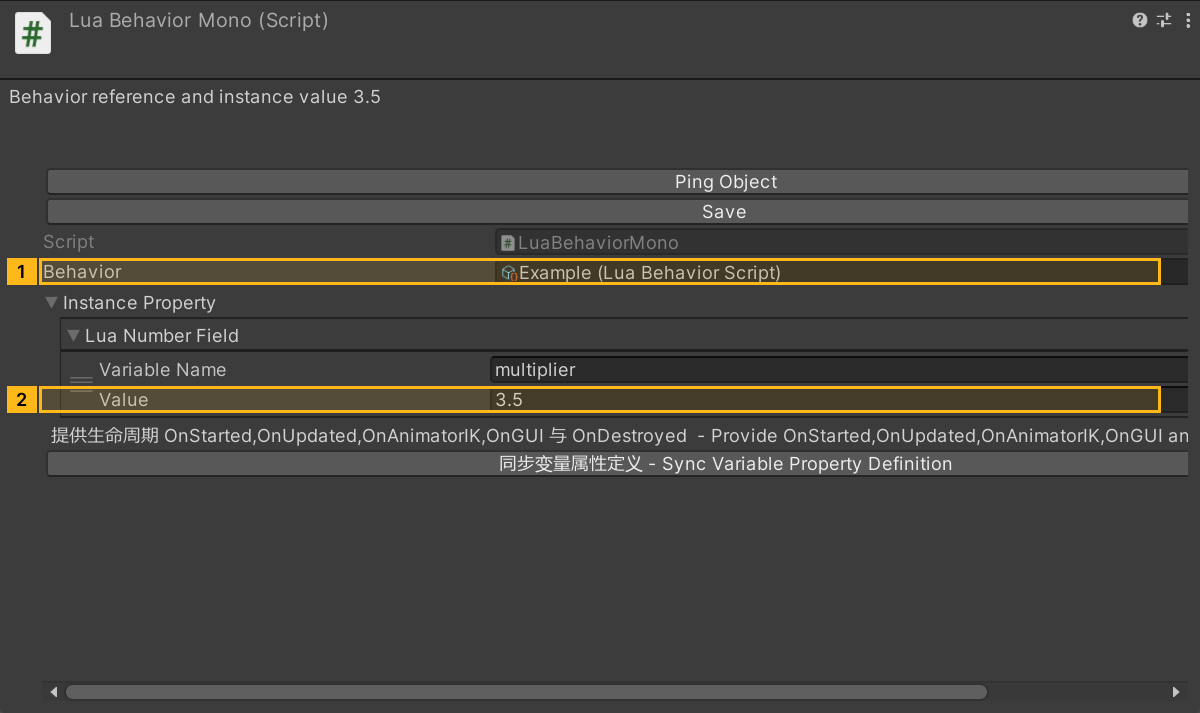
In Instance Property, expand the number list, find multiplier, set its value to 3.5, and save the prefab. The serialized path is instanceLuaProperty.numberProperties.
Click to expand MCP actionsClick to collapse MCP actions
[
  {
    "tool": "prefab_edit",
    "arguments": {
      "json": {
        "path": "${prefab}",
        "mode": "update",
        "component": "ShanghaiWindy.Core.Lua.LuaBehaviorMono",
        "values": {
          "instanceLuaProperty": {
            "numberProperties": [
              {
                "variableName": "multiplier",
                "value": 3.5
              }
            ]
          }
        }
      }
    },
    "expect": {
      "equals": {
        "ok": true
      }
    }
  }
]
4. Verify the sync result
Sync again. Confirm the script default is 2 and the prefab instance remains at 3.5. Behavior initialization assigns the instance properties to the Lua class instance.
Click to expand MCP actionsClick to collapse MCP actions
[
  {
    "tool": "invoke",
    "arguments": {
      "path": "asset:${prefab}/LuaBehaviorMono/instanceLuaProperty/OverrideNilPropertyFrom",
      "args": [
        "@asset:${script}/luaProperty"
      ]
    },
    "expect": {
      "contains": "OK:"
    }
  },
  {
    "tool": "invoke",
    "arguments": {
      "path": "static:UnityEditor.PrefabUtility/SavePrefabAsset",
      "args": [
        "@asset:${prefab}"
      ]
    },
    "expect": {
      "contains": "--- GameObject ---"
    }
  },
  {
    "tool": "inspect",
    "arguments": {
      "path": "asset:${prefab}/LuaBehaviorMono/instanceLuaProperty/numberProperties/0/variableName"
    },
    "expect": {
      "contains": "(String) multiplier"
    }
  },
  {
    "tool": "inspect",
    "arguments": {
      "path": "asset:${prefab}/LuaBehaviorMono/instanceLuaProperty/numberProperties/0/value"
    },
    "expect": {
      "contains": "(Single) 3.5"
    }
  },
  {
    "tool": "inspect",
    "arguments": {
      "path": "asset:${script}/luaProperty/numberProperties/0/value"
    },
    "expect": {
      "contains": "(Single) 2"
    }
  }
]