Create a visual effects mod
中文 | English
Run this command at the repository root to replay the examples through the local Unity MCP. The command also captures screenshots in both languages.
python Docs/Manual/manual/tools/tutorials.py run vfx-mod --capture
Click to expand MCP actionsClick to collapse MCP actions
Prepare the teaching sample. The recipe provides ${variables}.
{
  "variables": {
    "prefab": "${fixture}/TutorialVFX.prefab",
    "identifier": "${fixture}/TutorialVFXIdentifier.asset",
    "pool": "${fixture}/TutorialVFXPool.asset",
    "pipeline": "${fixture}/Docs_${runId}_Pipeline.asset",
    "package": "${fixture}/Docs_${runId}_Package.asset",
    "packageGuid": "69127c62-2de8-5f37-ac99-fe95537a9298",
    "bulletVfx": "${fixture}/TutorialBulletVFX.asset"
  },
  "calls": [
    {
      "tool": "invoke",
      "arguments": {
        "path": "static:UnityEditor.AssetDatabase/CreateFolder",
        "args": [
          "${fixtureParent}",
          "${folder}"
        ]
      },
      "expect": {
        "contains": "(String)"
      }
    },
    {
      "tool": "invoke",
      "arguments": {
        "path": "static:UnityEditor.AssetDatabase/CreateAsset",
        "args": [
          "@static:UnityEngine.ScriptableObject/CreateInstance(ShanghaiWindy.Core.ModPackageData)",
          "${package}"
        ]
      },
      "expect": {
        "contains": "OK:"
      },
      "phase": "build"
    },
    {
      "tool": "invoke",
      "arguments": {
        "path": "static:UnityEditor.AssetDatabase/CreateAsset",
        "args": [
          "@static:UnityEngine.ScriptableObject/CreateInstance(ShanghaiWindy.Core.ModPackageBuildPiplineData)",
          "${pipeline}"
        ]
      },
      "expect": {
        "contains": "OK:"
      },
      "phase": "build"
    },
    {
      "tool": "inspect_set",
      "arguments": {
        "path": "asset:${package}/localizedModName/defaultName",
        "value": "Tutorial Package"
      },
      "expect": {
        "contains": "OK:"
      },
      "phase": "build"
    },
    {
      "tool": "inspect_set",
      "arguments": {
        "path": "asset:${package}/localizedDescription/defaultName",
        "value": "Documentation teaching package"
      },
      "expect": {
        "contains": "OK:"
      },
      "phase": "build"
    },
    {
      "tool": "inspect_set",
      "arguments": {
        "path": "asset:${package}/author",
        "value": "Documentation"
      },
      "expect": {
        "contains": "OK:"
      },
      "phase": "build"
    },
    {
      "tool": "inspect_set",
      "arguments": {
        "path": "asset:${package}/supportURL",
        "value": "https://doc.game.windyverse.net/"
      },
      "expect": {
        "contains": "OK:"
      },
      "phase": "build"
    },
    {
      "tool": "inspect_set",
      "arguments": {
        "path": "asset:${package}/guid",
        "value": "${packageGuid}"
      },
      "expect": {
        "contains": "OK:"
      },
      "phase": "build"
    },
    {
      "tool": "inspect_set",
      "arguments": {
        "path": "asset:${pipeline}/linkedModPackage",
        "value": "@asset:${package}"
      },
      "expect": {
        "contains": "OK:"
      },
      "phase": "build"
    }
  ]
}
This example registers an effect under TutorialVFX and uses it for a shell projectile. For your first shell, check the muzzle flash, projectile, and impact with the built-in effects in the tank tutorial before replacing them.
1. Create an identifier and an effect prefab
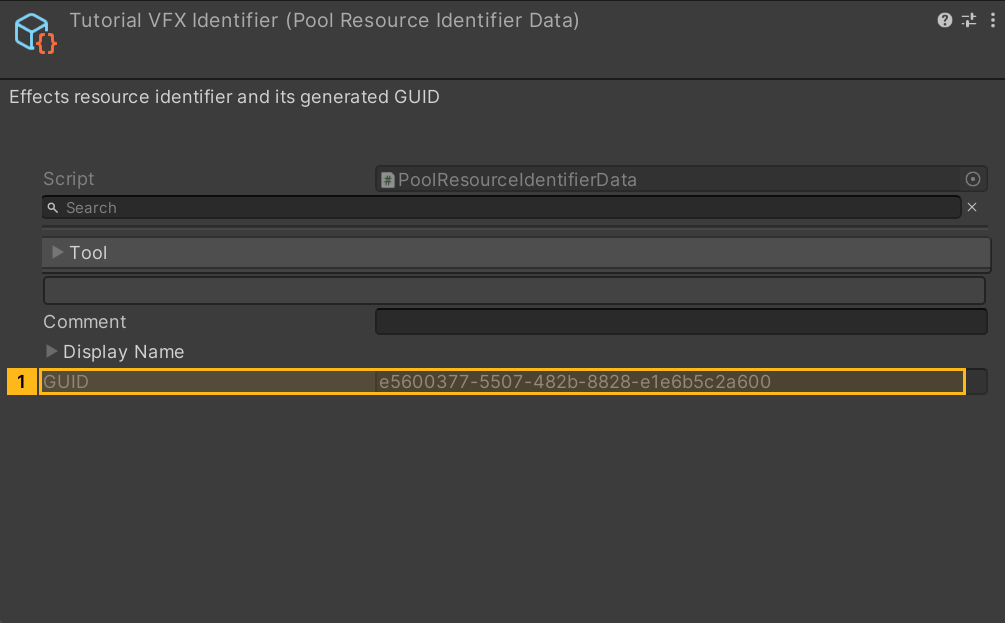
- In Project, right-click and choose Create → A Panzer War → P Pool → Pool Resource Identifier. Set the display name. The game uses the identifier to list the installed effects pack as a choice, and Unity creates its GUID. To extend the old Ma Ge effects pack, obtain the original identifier from its author. An identically named new asset gets its own GUID.
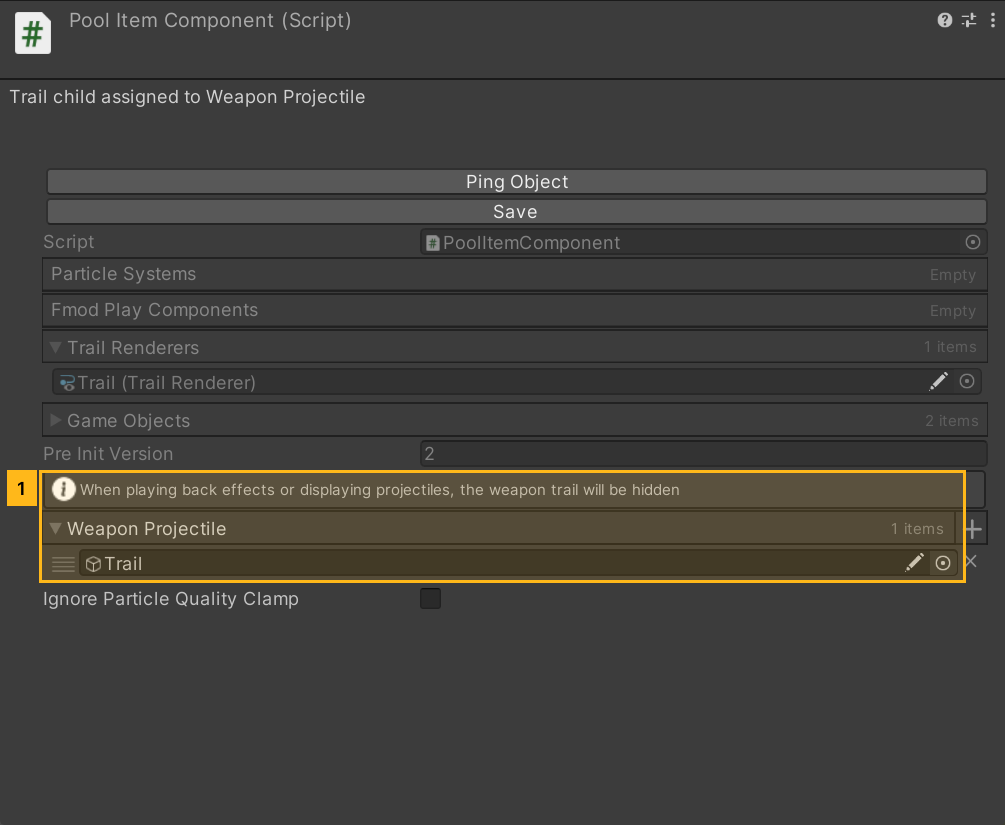
- Put the particle effect on a separate GameObject and drag it into Project to save a prefab. Open it and add PoolItemComponent to the root. For a shell trail, add Trail Renderer to a child named
Trailand assign that child to Weapon Projectile. Damage replay and projectile previews hide that trail. Save the prefab and check that the reference remains on the root component.
Click to expand MCP actionsClick to collapse MCP actions
[
  {
    "tool": "prefab_edit",
    "arguments": {
      "json": {
        "path": "${prefab}",
        "mode": "create",
        "component": "ShanghaiWindy.Core.PoolItemComponent",
        "children": [
          "Trail"
        ],
        "values": {
          "weaponProjectiles": [
            null
          ]
        },
        "references": [
          {
            "property": "weaponProjectiles.Array.data[0]",
            "child": "Trail",
            "component": "UnityEngine.GameObject"
          }
        ]
      }
    },
    "expect": {
      "equals": {
        "ok": true
      }
    }
  },
  {
    "tool": "prefab_edit",
    "arguments": {
      "json": {
        "path": "${prefab}",
        "mode": "update",
        "component": "UnityEngine.TrailRenderer",
        "child": "Trail"
      }
    },
    "expect": {
      "equals": {
        "ok": true
      }
    }
  },
  {
    "tool": "inspect",
    "arguments": {
      "path": "asset:${prefab}/PoolItemComponent/weaponProjectiles/0/name"
    },
    "expect": {
      "contains": "(String) Trail"
    }
  }
]
2. Configure the pool resource
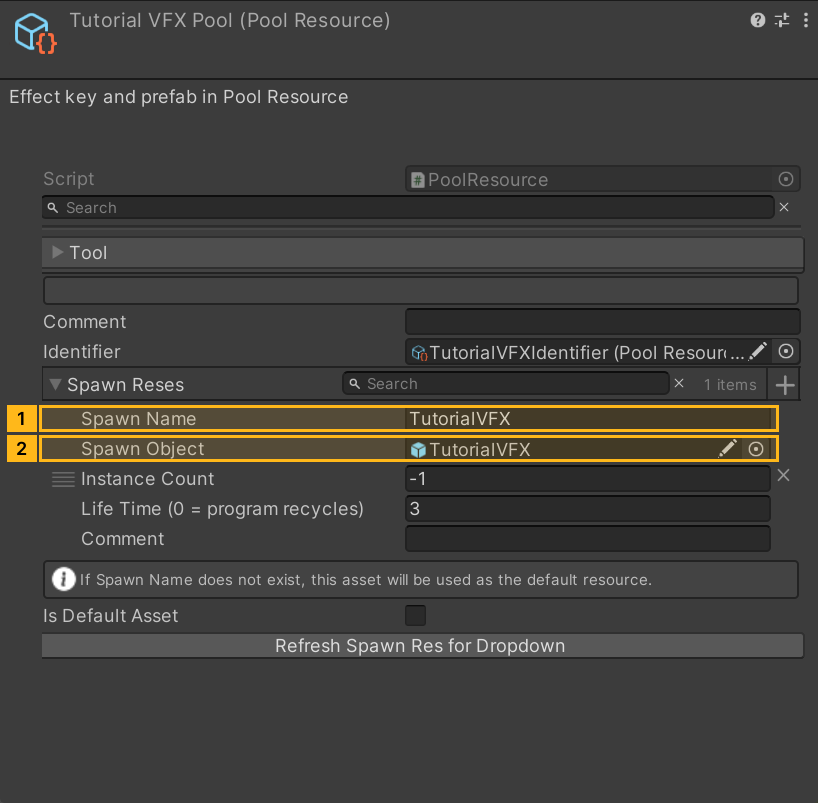
From the same P Pool menu, create a Pool Resource. Assign the identifier from step 1. Expand Spawn Reses and click + to add an entry.
| Field | Example | Use |
|---|---|---|
| Spawn Name | TutorialVFX |
Key used at runtime. Choose a unique name for your own mod. |
| Spawn Object | Prefab from section 1 | The pool instantiates this prefab when requested. |
| Instance Count | -1 |
Create instances on demand. Positive counts preload instances to reduce first-use stutter. Higher counts use more memory and load time. |
| Life Time | 3 seconds |
Recycle ordinary one-shot effects after this delay. Reserve 0 for effects recycled by code, such as jets of flame or beams. |
Save and click Refresh Spawn Res for Dropdown. If the key is missing, check that the entry was saved and has a prefab, then refresh again.
Click to expand MCP actionsClick to collapse MCP actions
[
  {
    "tool": "invoke",
    "arguments": {
      "path": "static:UnityEditor.AssetDatabase/CreateAsset",
      "args": [
        "@static:UnityEngine.ScriptableObject/CreateInstance(ShanghaiWindy.Core.PoolResourceIdentifierData)",
        "${identifier}"
      ]
    },
    "expect": {
      "contains": "OK:"
    }
  },
  {
    "tool": "invoke",
    "arguments": {
      "path": "asset:${identifier}/OnValidate",
      "args": []
    },
    "expect": {
      "contains": "OK:"
    }
  },
  {
    "tool": "inspect",
    "arguments": {
      "path": "asset:${identifier}/guid"
    },
    "expect": {
      "contains": "(String)"
    },
    "capture": {
      "poolGuid": {
        "regex": "\\(String\\) ([a-f0-9-]{36})"
      }
    }
  },
  {
    "tool": "invoke",
    "arguments": {
      "path": "static:UnityEditor.AssetDatabase/CreateAsset",
      "args": [
        "@static:UnityEngine.ScriptableObject/CreateInstance(ShanghaiWindy.Core.PoolResource)",
        "${pool}"
      ]
    },
    "expect": {
      "contains": "OK:"
    }
  },
  {
    "tool": "invoke",
    "arguments": {
      "path": "static:UnityEngine.JsonUtility/FromJsonOverwrite",
      "args": [
        "{\"spawnReses\":[{\"spawnName\":\"TutorialVFX\",\"instanceCount\":-1,\"lifeTime\":3}]}",
        "@asset:${pool}"
      ]
    },
    "expect": {
      "contains": "OK:"
    }
  },
  {
    "tool": "inspect_set",
    "arguments": {
      "path": "asset:${pool}/identifier",
      "value": "@asset:${identifier}"
    },
    "expect": {
      "contains": "OK:"
    }
  },
  {
    "tool": "inspect_set",
    "arguments": {
      "path": "asset:${pool}/spawnReses/0/spawnObject",
      "value": "@asset:${prefab}"
    },
    "expect": {
      "contains": "OK:"
    }
  },
  {
    "tool": "invoke",
    "arguments": {
      "path": "static:UnityEditor.EditorUtility/SetDirty",
      "args": [
        "@asset:${pool}"
      ]
    },
    "expect": {
      "contains": "OK:"
    }
  },
  {
    "tool": "invoke",
    "arguments": {
      "path": "static:UnityEditor.AssetDatabase/SaveAssets",
      "args": []
    },
    "expect": {
      "contains": "OK:"
    }
  },
  {
    "tool": "inspect",
    "arguments": {
      "path": "asset:${pool}/spawnReses/0/spawnObject/name"
    },
    "expect": {
      "contains": "(String) TutorialVFX"
    }
  }
]
3. Bind, package, and try the effect
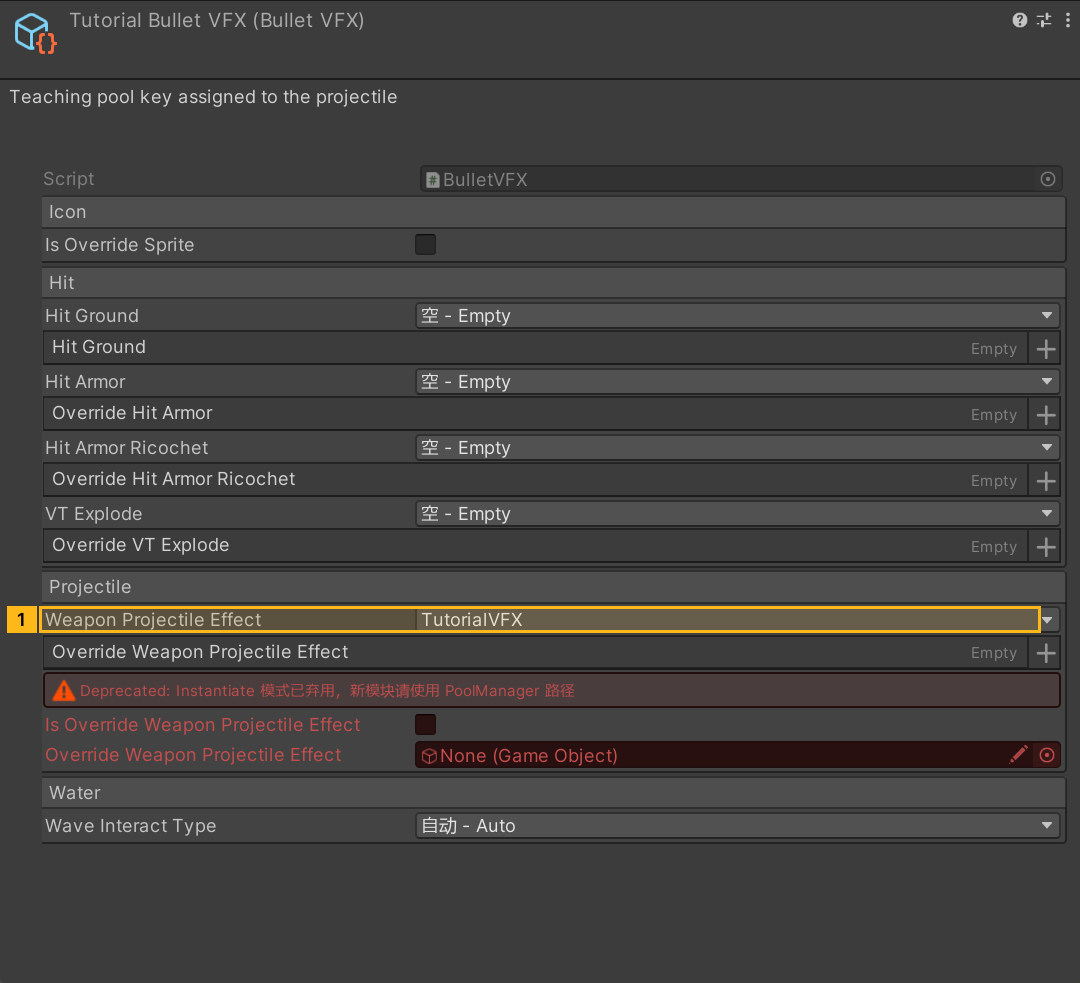
- Select the shell and open its BulletVFX asset. Select
TutorialVFXas the Weapon Projectile Effect. To keep the existing projectile appearance as a fallback, addTutorialVFXto the Override Weapon Projectile Effect list and leave the base key in place. Use Hit Ground or Hit Armor for impact effects. Return to the shell and verify its BulletVFX reference. - If the vehicle and effect are in one pack, add Pool Resource and the vehicle to the same build pipeline. For separate packs, add Pool Resource to the effects pipeline's Linked Objects and build it. Add the effects pack's ModPackageData GUID to the vehicle pack's dependencies, then rebuild the vehicle pack. The dependency identifies a mod package. The resource identifier GUID is used for the effects pack selection.
- Install the builds for the same platform and shoot the ground and an armored target. Check the custom projectile, fallback effect, and one-shot effect recycling. If you see the base effect, check the exact spelling, whether the dependency loaded, and which effects pack is selected. When several installed pools have the same key, the selected effects pack has priority.
Click to expand MCP actionsClick to collapse MCP actions
[
  {
    "tool": "invoke",
    "arguments": {
      "path": "static:UnityEditor.AssetDatabase/CreateAsset",
      "args": [
        "@static:UnityEngine.ScriptableObject/CreateInstance(ShanghaiWindy.Core.BulletVFX)",
        "${bulletVfx}"
      ]
    },
    "expect": {
      "contains": "OK:"
    }
  },
  {
    "tool": "inspect_set",
    "arguments": {
      "path": "asset:${bulletVfx}/weaponProjectileEffect",
      "value": "TutorialVFX"
    },
    "expect": {
      "contains": "OK:"
    }
  },
  {
    "tool": "inspect",
    "arguments": {
      "path": "asset:${bulletVfx}/weaponProjectileEffect"
    },
    "expect": {
      "contains": "(String) TutorialVFX"
    }
  },
  {
    "tool": "invoke",
    "arguments": {
      "path": "static:UnityEditor.EditorUtility/SetDirty",
      "args": [
        "@asset:${bulletVfx}"
      ]
    },
    "expect": {
      "contains": "OK:"
    }
  },
  {
    "tool": "invoke",
    "arguments": {
      "path": "static:UnityEditor.AssetDatabase/SaveAssets",
      "args": []
    },
    "expect": {
      "contains": "OK:"
    }
  },
  {
    "tool": "invoke",
    "arguments": {
      "path": "asset:${pipeline}/linkedObjects/Add",
      "args": [
        "@asset:${pool}"
      ]
    },
    "expect": {
      "contains": "OK:"
    },
    "phase": "build"
  },
  {
    "tool": "invoke",
    "arguments": {
      "path": "static:UnityEditor.EditorUtility/SetDirty",
      "args": [
        "@asset:${pipeline}"
      ]
    },
    "expect": {
      "contains": "OK:"
    },
    "phase": "build"
  },
  {
    "tool": "invoke",
    "arguments": {
      "path": "static:UnityEditor.AssetDatabase/SaveAssets",
      "args": []
    },
    "expect": {
      "contains": "OK:"
    },
    "phase": "build"
  },
  {
    "tool": "modpack_plan",
    "arguments": {
      "pipeline": "${pipeline}"
    },
    "expect": {
      "equals": {
        "ok": true,
        "built": false
      },
      "contains": "\"pooldata\""
    },
    "phase": "build"
  },
  {
    "tool": "modpack_build",
    "arguments": {
      "pipeline": "${pipeline}"
    },
    "expect": {
      "equals": {
        "ok": true,
        "archiveExists": true,
        "published": false,
        "installed": false
      }
    },
    "capture": {
      "archivePath": {
        "path": "archivePath"
      }
    },
    "phase": "build"
  },
  {
    "tool": "invoke",
    "arguments": {
      "path": "static:Frontend.Editor.ModPackageWorkshopMeta/WriteSidecar",
      "args": [
        "${archivePath}"
      ]
    },
    "expect": {
      "contains": ".modpack.json"
    },
    "capture": {
      "sidecarPath": {
        "regex": "\\(String\\) (.+)"
      }
    },
    "phase": "build"
  },
  {
    "tool": "invoke",
    "arguments": {
      "path": "static:System.IO.File/ReadAllText",
      "args": [
        "${sidecarPath}"
      ]
    },
    "expect": {
      "contains": "${packageGuid}"
    },
    "phase": "build"
  }
]