Tracked tank engine, gears and RPM
中文 | English
Run this command at the repository root to replay the examples through the local Unity MCP. The command also captures screenshots in both languages.
python Docs/Manual/manual/tools/tutorials.py run tank-engine-rpm --capture
Click to expand MCP actionsClick to collapse MCP actions
Prepare the teaching sample. The recipe provides ${variables}.
{
  "variables": {
    "text": "${fixture}/Tutorial_EngineVehicleText.asset",
    "fmod": "${fixture}/Tutorial_EngineSound.asset"
  },
  "calls": [
    {
      "tool": "invoke",
      "arguments": {
        "path": "static:UnityEditor.AssetDatabase/CreateFolder",
        "args": [
          "${fixtureParent}",
          "${folder}"
        ]
      },
      "expect": {
        "contains": "(String)"
      }
    },
    {
      "tool": "invoke",
      "arguments": {
        "path": "static:UnityEditor.AssetDatabase/CopyAsset",
        "args": [
          "Packages/com.shanghaiwindy.coreresources/Editor/DocumentationSamples/vehicle-basics/Tutorial_NativeText.asset",
          "${text}"
        ]
      },
      "expect": {
        "contains": "True"
      }
    },
    {
      "tool": "invoke",
      "arguments": {
        "path": "static:UnityEditor.AssetDatabase/CopyAsset",
        "args": [
          "Packages/com.shanghaiwindy.coreresources/FMod/Tank/Engine/kv220.asset",
          "${fmod}"
        ]
      },
      "expect": {
        "contains": "True"
      }
    }
  ]
}
Once your first vehicle can move forward and reverse, tune its engine, shifts and sound. Take a baseline speed and RPM reading on level ground, then change one group of settings at a time.
1. Find the vehicle's engine parameters
- Select VehicleTextData in Project and open Mobility → Track Params (
PTCParameter). Check Mass, the wheel collider prefab and the track reference. The teaching tank has a mass of 30,000 kg. - Check Shared Engine Data (
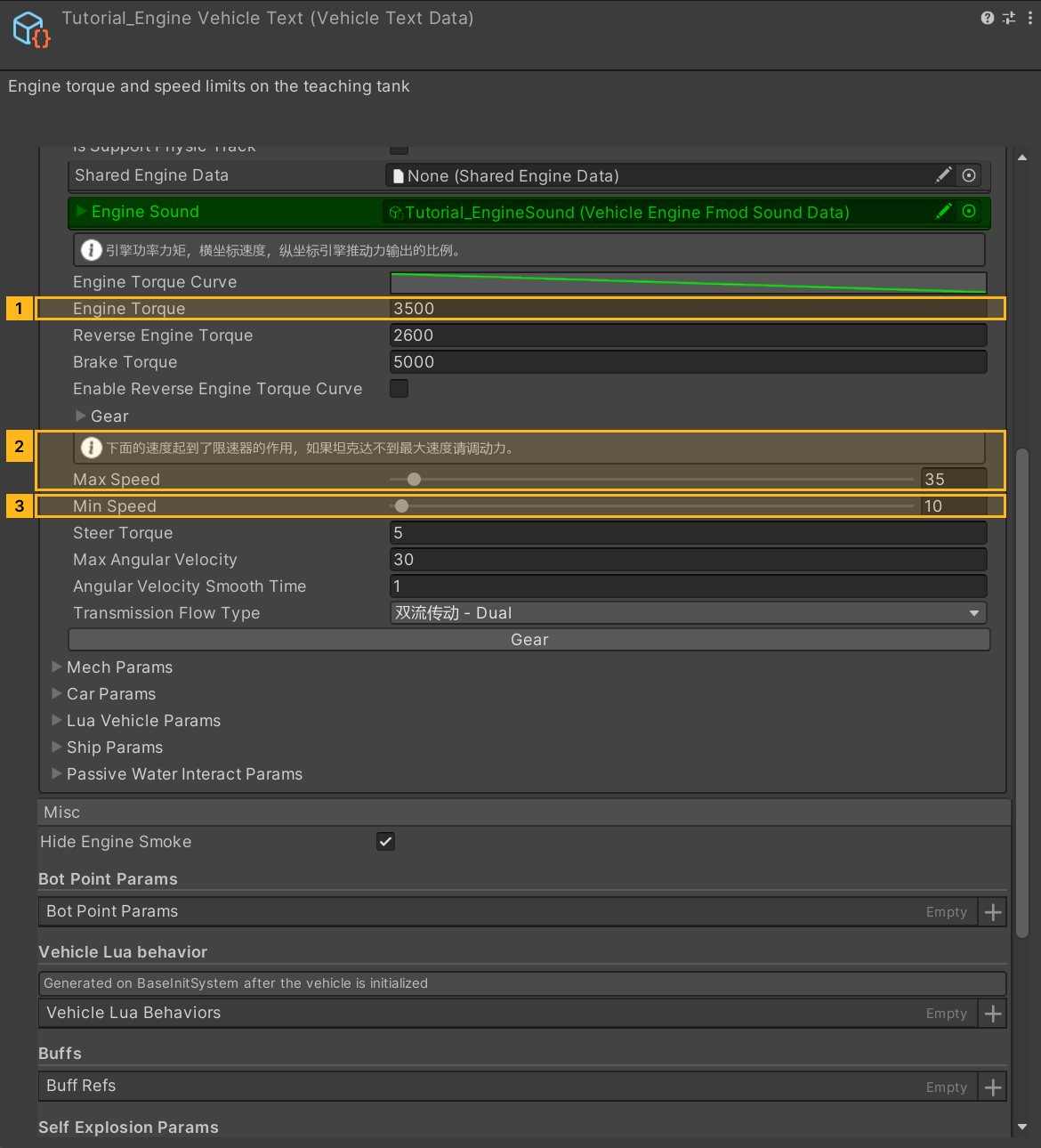
sharedEngineData). With an empty reference, edit the local parameters. With a reference assigned, open SharedEngineData to edit the shared engine and sound. To tune a single vehicle, duplicate that asset and assign the copy. - Set the power and speed limits. The example uses
engineTorque = 3500,maxSpeed = 35km/h andminSpeed = 10km/h. Enter the reverse limit,minSpeed, as a positive magnitude.
| Parameter | How to tune it |
|---|---|
engineTorque, reversingEngineTorque |
Base drive torque for the forward and reverse directions. For a weak launch, check the wheel colliders and mass first, then increase torque in steps. |
engineTorqueCurve |
Speed in km/h on the horizontal axis and drive output multiplier on the vertical axis. The low-speed keys affect launch. If output falls to zero too early, the tank may never reach the configured speed. |
enableReverseEngineTorqueCurve |
Enable it to edit a separate reverseEngineTorqueCurve. |
brakeTorque, steerTorque |
Tune braking and steering separately. Accelerate in a straight line before checking braking and low-speed turns. |
maxSpeed, minSpeed |
Forward and reverse speed caps. Achievable speed also depends on power, terrain and resistance. |
Click to expand MCP actionsClick to collapse MCP actions
[
  {
    "tool": "inspect_set",
    "arguments": {
      "path": "asset:${text}/PTCParameter/Mass",
      "value": "30000"
    },
    "expect": {
      "contains": "OK:"
    }
  },
  {
    "tool": "inspect",
    "arguments": {
      "path": "asset:${text}/PTCParameter/Mass"
    },
    "expect": {
      "contains": "30000"
    }
  },
  {
    "tool": "inspect_set",
    "arguments": {
      "path": "asset:${text}/PTCParameter/engineTorque",
      "value": "3500"
    },
    "expect": {
      "contains": "OK:"
    }
  },
  {
    "tool": "inspect",
    "arguments": {
      "path": "asset:${text}/PTCParameter/engineTorque"
    },
    "expect": {
      "contains": "3500"
    }
  },
  {
    "tool": "inspect_set",
    "arguments": {
      "path": "asset:${text}/PTCParameter/maxSpeed",
      "value": "35"
    },
    "expect": {
      "contains": "OK:"
    }
  },
  {
    "tool": "inspect",
    "arguments": {
      "path": "asset:${text}/PTCParameter/maxSpeed"
    },
    "expect": {
      "contains": "35"
    }
  },
  {
    "tool": "inspect_set",
    "arguments": {
      "path": "asset:${text}/PTCParameter/minSpeed",
      "value": "10"
    },
    "expect": {
      "contains": "OK:"
    }
  },
  {
    "tool": "inspect",
    "arguments": {
      "path": "asset:${text}/PTCParameter/minSpeed"
    },
    "expect": {
      "contains": "10"
    }
  }
]
2. Generate gears and set the RPM range
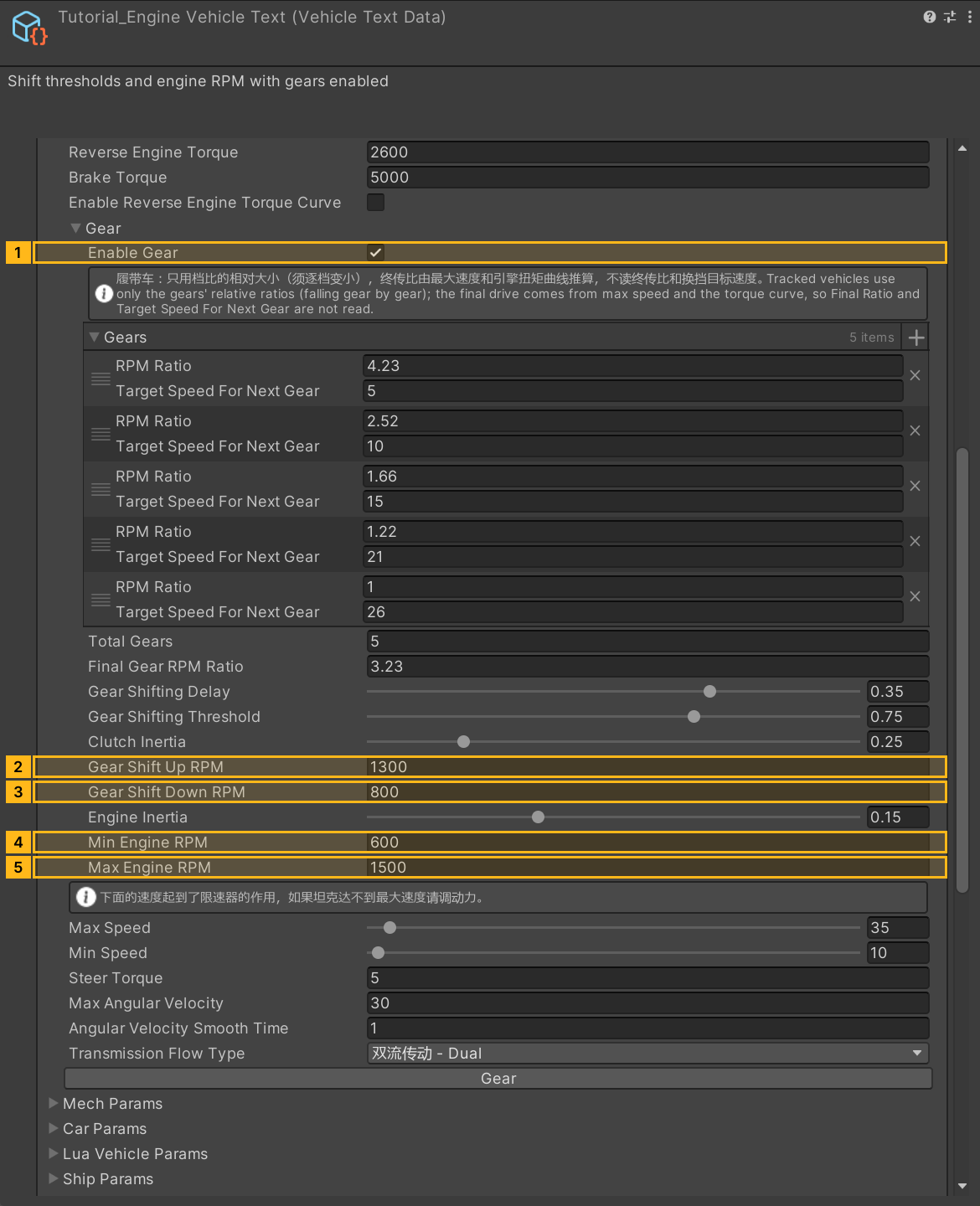
- Expand Gear, set Total Gears to 5 and click the Gear initialization button (
InitGear()). It enables gears and rebuilds the list. Tracked vehicles use the tracked drivetrain. Enable Gear also exposes these authoring fields. Save a copy before overwriting a custom gear table. - Verify that the RPM Ratio values in
gearsare positive and decrease from one gear to the next. The tracked drivetrain uses their relative spacing. It derives the final drive from the speed cap and torque curve. The wheeled-drive fieldsfinalRatioandtargetSpeedForNextGeardo not enter that calculation. - Set
minEngineRPM = 600,gearShiftDownRPM = 800,gearShiftUpRPM = 1300andmaxEngineRPM = 1500. Keep idle, downshift, upshift and redline in ascending RPM order. The tracked drivetrain adjusts actual shift points for throttle and load. Compare the shift delay and rev rise when tuninggearShiftingDelayandengineInertia. - Assign a working VehicleEngineFmodSoundData to Engine Sound (
vehicleEngineFmodSoundData). The vehicle reports physical revs per minute. FMOD's running event receives a normalized 0–100RPMvalue between idle and redline. Read both values with the TankAPI engine state.
Click to expand MCP actionsClick to collapse MCP actions
[
  {
    "tool": "invoke",
    "arguments": {
      "path": "asset:${text}/PTCParameter/InitGear",
      "args": []
    },
    "expect": {
      "contains": "OK:"
    }
  },
  {
    "tool": "inspect_set",
    "arguments": {
      "path": "asset:${text}/PTCParameter/gearParameter/enableGear",
      "value": "true"
    },
    "expect": {
      "contains": "OK:"
    }
  },
  {
    "tool": "inspect_set",
    "arguments": {
      "path": "asset:${text}/PTCParameter/gearParameter/minEngineRPM",
      "value": "600"
    },
    "expect": {
      "contains": "OK:"
    }
  },
  {
    "tool": "inspect",
    "arguments": {
      "path": "asset:${text}/PTCParameter/gearParameter/minEngineRPM"
    },
    "expect": {
      "contains": "600"
    }
  },
  {
    "tool": "inspect_set",
    "arguments": {
      "path": "asset:${text}/PTCParameter/gearParameter/maxEngineRPM",
      "value": "1500"
    },
    "expect": {
      "contains": "OK:"
    }
  },
  {
    "tool": "inspect",
    "arguments": {
      "path": "asset:${text}/PTCParameter/gearParameter/maxEngineRPM"
    },
    "expect": {
      "contains": "1500"
    }
  },
  {
    "tool": "inspect_set",
    "arguments": {
      "path": "asset:${text}/PTCParameter/gearParameter/gearShiftDownRPM",
      "value": "800"
    },
    "expect": {
      "contains": "OK:"
    }
  },
  {
    "tool": "inspect",
    "arguments": {
      "path": "asset:${text}/PTCParameter/gearParameter/gearShiftDownRPM"
    },
    "expect": {
      "contains": "800"
    }
  },
  {
    "tool": "inspect_set",
    "arguments": {
      "path": "asset:${text}/PTCParameter/gearParameter/gearShiftUpRPM",
      "value": "1300"
    },
    "expect": {
      "contains": "OK:"
    }
  },
  {
    "tool": "inspect",
    "arguments": {
      "path": "asset:${text}/PTCParameter/gearParameter/gearShiftUpRPM"
    },
    "expect": {
      "contains": "1300"
    }
  },
  {
    "tool": "inspect_set",
    "arguments": {
      "path": "asset:${text}/PTCParameter/vehicleEngineFmodSoundData",
      "value": "@asset:${fmod}"
    },
    "expect": {
      "contains": "OK:"
    }
  }
]
3. Check driving and audio
Save, rebuild and test-drive the vehicle. Accelerate from a standstill on level ground. Observe rising speed and revs, an RPM drop on upshifts, and downshifts as the tank slows. Then reverse and brake. Check both driver and external views for engine sound that follows the revs.
- If revs rise and the tank stays in place, check for wheel contact and drive torque at the wheels.
- If it cannot reach the target speed, inspect the torque curve's output at that speed and retest the top gear after adjusting the cap.
- If speed and revs change but the sound does not, confirm that the sound asset and FMOD bank are loaded and the running event receives the 0–100
RPMvalue.
Click to expand MCP actionsClick to collapse MCP actions
[
  {
    "tool": "inspect",
    "arguments": {
      "path": "asset:${text}/PTCParameter/vehicleEngineFmodSoundData/name"
    },
    "expect": {
      "contains": "Tutorial_EngineSound"
    }
  },
  {
    "tool": "inspect",
    "arguments": {
      "path": "asset:${text}/PTCParameter/gearParameter/gears/Length"
    },
    "expect": {
      "contains": "(Int32) 5"
    }
  }
]
Click to expand MCP actionsClick to collapse MCP actions
Runtime test pending. Bind the spawned tank ID. The tool applies throttle. Observe RPM and audio as described in the guide.
[
  {
    "tool": "runtime_status",
    "arguments": {}
  },
  {
    "tool": "range_drive",
    "arguments": {
      "id": "${tankEntityId}",
      "mode": "input",
      "accel": 1,
      "seconds": 5
    }
  },
  {
    "tool": "range_drive",
    "arguments": {
      "id": "${tankEntityId}",
      "mode": "input",
      "accel": -1,
      "seconds": 5
    }
  }
]