Troubleshoot a vehicle mod
中文 | English
Run this command at the repository root to replay the examples through the local Unity MCP. The command also captures screenshots in both languages.
python Docs/Manual/manual/tools/tutorials.py run vehicle-dev-qa --capture
Click to expand MCP actionsClick to collapse MCP actions
Prepare the teaching sample. The recipe provides ${variables}.
{
  "variables": {
    "asset": "${fixture}/Tutorial_VehicleQA.asset"
  },
  "calls": [
    {
      "tool": "invoke",
      "arguments": {
        "path": "static:UnityEditor.AssetDatabase/CreateFolder",
        "args": [
          "${fixtureParent}",
          "${folder}"
        ]
      },
      "expect": {
        "contains": "(String)"
      }
    }
  ]
}
A vehicle fails to load
Check the installation folder and platform in mod installation. Find the first error in the runtime log and confirm that the package links to the right build pipeline. If the vehicle loads but behaves incorrectly, use VehicleTextData to check vehicle data, hitboxes, tracks, shells, engine sounds and firing sounds.
The old project could fail when the package and vehicle shared a name. If the vehicle's internal name is T-72, try naming the package Vehicle-T-72, rebuild, and check whether it loads. If the vehicle appears but fails to run, start from VehicleData and follow its references to the main model, damage prefab, movement data, and firing data. Compare them with a working SDK vehicle.
The gun cannot elevate or depress
For ordinary guns, use positive magnitudes for Elevate Angle and Depression Angle. For example, UpMaxDegree = 20 and DownMaxDegree = 8 give a range of -8° to 20°. Check the shared turret data and any directional override. maxTurretPositiveAngle and maxTurretNegativeAngle control horizontal traverse.
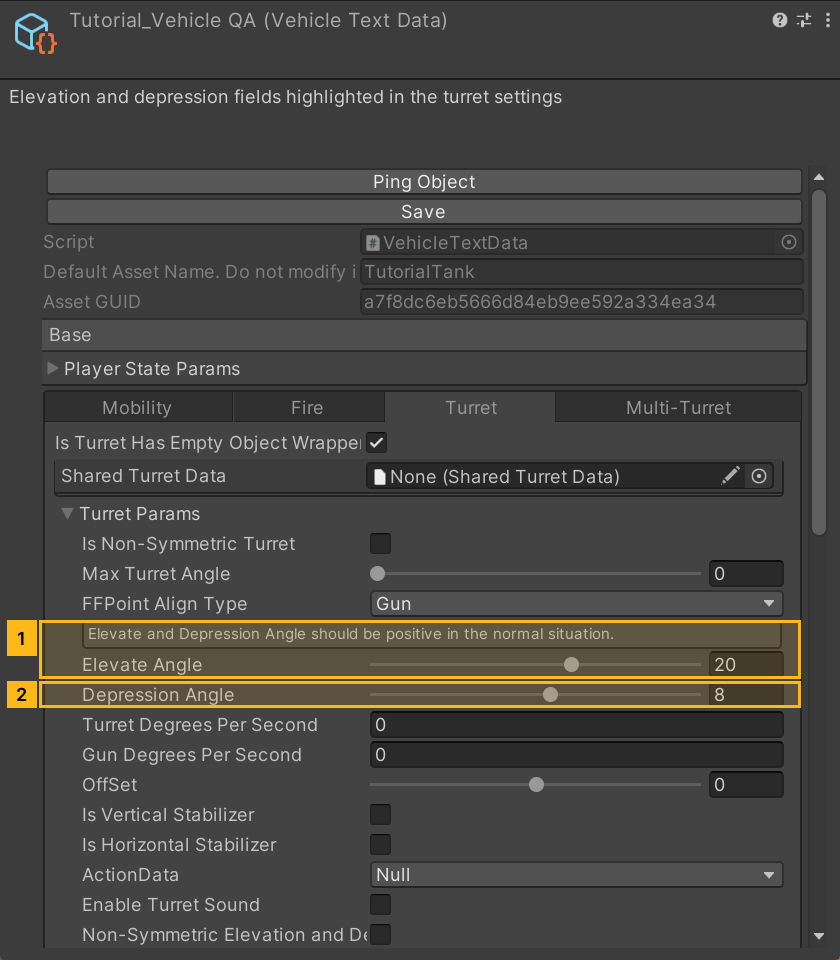
Click to expand MCP actionsClick to collapse MCP actions
[
  {
    "tool": "invoke",
    "arguments": {
      "path": "static:UnityEditor.AssetDatabase/CopyAsset",
      "args": [
        "Packages/com.shanghaiwindy.coreresources/Editor/DocumentationSamples/vehicle-text-data/Tutorial_VehicleTextData.asset",
        "${asset}"
      ]
    },
    "expect": {
      "contains": "(Boolean) True"
    }
  },
  {
    "tool": "inspect_set",
    "arguments": {
      "path": "asset:${asset}/sharedTurretData",
      "value": "null"
    },
    "expect": {
      "contains": "OK:"
    }
  },
  {
    "tool": "inspect_set",
    "arguments": {
      "path": "asset:${asset}/MTParameter/UpMaxDegree",
      "value": "20"
    },
    "expect": {
      "contains": "OK:"
    }
  },
  {
    "tool": "inspect_set",
    "arguments": {
      "path": "asset:${asset}/MTParameter/DownMaxDegree",
      "value": "8"
    },
    "expect": {
      "contains": "OK:"
    }
  },
  {
    "tool": "inspect",
    "arguments": {
      "path": "asset:${asset}/GetTurretParam()/UpMaxDegree"
    },
    "expect": {
      "contains": "(Single) 20"
    }
  },
  {
    "tool": "inspect",
    "arguments": {
      "path": "asset:${asset}/GetTurretParam()/DownMaxDegree"
    },
    "expect": {
      "contains": "(Single) 8"
    }
  }
]
Handling or suspension problems
- Under VehicleTextData → Mobility, check vehicle mass in kilograms. The original T-72 example used
44100 kg. Check that the field is in kilograms if your source gives mass in tonnes. - Open the WheelCollider prefab referenced under Mobility. Its Mass is the wheel's mass. The old example used
320 kg, Radius0.5, Wheel Damping Rate0.25, and Suspension Distance0.2. The old guide suggested keeping wheel mass at or below1000 kgas a starting point. - For Suspension Spring, start with the current template's Spring
205000, Damper14500, and Target Position0.5. Tune after testing against the wheel size and vehicle mass. Wheel and friction setup
Incorrect shading or missing surfaces
- Select the normal texture in Unity. Set Texture Type to Normal Map, click Apply, and assign it to the material's normal slot.
- Turn on Blender's Face Orientation overlay. On a closed mesh, select faces that show red from the outside and use Mesh → Normals → Recalculate Outside in Edit Mode, or flip the selected normals. For intentionally double-sided surfaces, check the material. Use the rendering guide to troubleshoot other visibility problems.
A secondary turret reports an index error
Check that the error in the log refers to shell data, then open the bulletData list used by each secondary turret. Verify that each list has at least one valid shell and that the selected index is smaller than the list length. Compare against the vehicle modding notes and the template vehicle.